I was sitting at my desk last Tuesday, staring at a literal “nest” of black wires snaking behind my monitor, when I felt a sudden, inexplicable wave of anxiety wash over me. It wasn’t just the mess; it was the subconscious weight of that visual chaos pulling at my focus. We often think that a cluttered desk is just an aesthetic problem, but as a psychologist, I know it’s actually a cognitive drain. Most people assume that cable management diy projects are just about making a room look “Pinterest-perfect,” but the real truth is much deeper: a tangled workspace is a tangled mind.
In this guide, I’m skipping the expensive, over-designed gadgets you see in glossy magazines and getting straight to the practical, psychological wins. I’ll show you how to implement effective cable management diy strategies using simple, affordable tools that actually work for a busy lifestyle. We aren’t just hiding wires; we are reclaiming your mental bandwidth and creating a sanctuary for deep work. Let’s turn that digital jungle into a streamlined system that supports your focus instead of stealing it.
Table of Contents
- Step-by-Step Instructions
- Creating Focus Through Under Desk Cable Management Solutions
- Hiding Computer Wires at Home to Reclaim Mental Clarity
- 5 Small Shifts to Keep Your Workspace (and Your Mind) Clutter-Free
- Final Thoughts: Cultivating a Workspace That Works for You
- ## The Mental Cost of Visual Noise
- Reclaiming Your Space and Your Focus
- Frequently Asked Questions
Guide Overview
Tools & Supplies
- Scissors or wire cutters for trimming ties
- Label maker or masking tape for identification
- Velcro cable ties (1 pack)
- Cable management sleeves or raceways (1 pack)
- Adhesive cable clips (1 pack)
- Power strip (1 unit)
Step-by-Step Instructions
- 1. First, we need to confront the chaos head-on. Unplug everything. I know, it sounds daunting, but you can’t organize a mess if you’re still trying to work through it. Lay all your cables out on the floor or a large table so you can see exactly what you’re dealing with. This is your moment to audit your tech; identify which cords are essential for your daily flow and which ones are just “ghost cables” from old devices that haven’t seen the light of day in years.
- 2. Once you have your essentials, grab some cleaning supplies. It’s much harder to feel a sense of calm and order when you’re touching layers of dust. Wipe down your power strips and the cables themselves. I find that a clean slate is essential for mental clarity before we even start the physical organization.
- 3. Now, let’s talk grouping. Use velcro ties—please, avoid those plastic zip ties if you can! Zip ties are permanent and can be a nightmare if you decide to rearrange your setup later. Velcro is gentle and reusable, which aligns perfectly with a flexible productivity mindset. Group your cables by their function: all your peripheral wires in one bundle, your power cables in another, and your data cables in a third.
- 4. Next, it’s time to utilize the “hidden” spaces. If you have a standing desk or a desk with a frame, this is where we get tactical. I love using adhesive cable clips to route wires along the underside or the legs of the desk. The goal is to keep the wires out of your line of sight. When your eyes aren’t constantly catching a stray wire peeking out from behind a monitor, your brain can finally settle into deep work mode.
- 5. For the heavy lifters—the bulky power bricks and the massive power strips—I highly recommend investing in a cable management box. It’s a simple, elegant way to hide the “nest” of plugs that usually lives on the floor. It turns a visual distraction into a clean, minimalist block that feels intentional rather than accidental.
- 6. Finally, add some labels. I use a small label maker to mark both ends of each cord (e.g., “Monitor 1” or “External Hard Drive”). It might feel a little extra, but trust me, when you need to swap a device in the future, you won’t be stuck in a frustrating guessing game. This small act of preparation is a gift to your future, more focused self.
Creating Focus Through Under Desk Cable Management Solutions
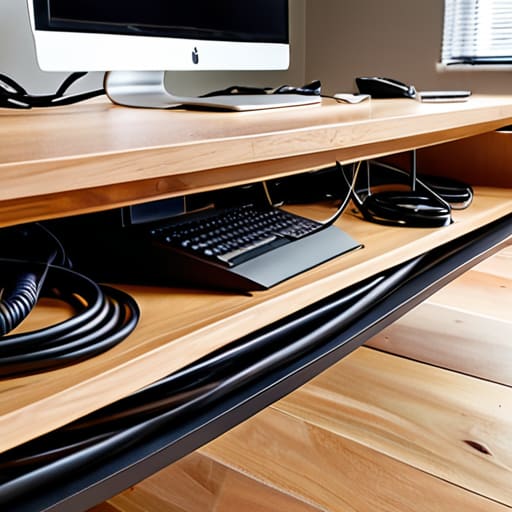
While we often focus on what’s visible on top of our desks, I’ve found that the real psychological heavy lifting happens below the surface. When I look down and see a chaotic “nest” of tangled black cords, my brain subconsciously registers it as unfinished business. This creates a subtle, constant cognitive load that drains your mental energy before you even start your first task. By implementing strategic under desk cable management solutions, you aren’t just tidying up; you are actively reducing visual noise to protect your focus.
If you’re on a budget, don’t feel like you need to buy expensive, high-end industrial trays. I love using cheap cable organization hacks, like utilizing adhesive command hooks or even simple binder clips to route cords along the underside of your desk frame. This keeps everything tucked away and out of your peripheral vision. Remember, the goal of hiding computer wires at home isn’t perfection—it’s about creating a predictable, calm environment where your mind feels safe to dive into deep, meaningful work without being pulled away by the chaos of a cluttered workspace.
Hiding Computer Wires at Home to Reclaim Mental Clarity

I often tell my clients that our physical environment acts as a mirror for our internal state. When I look down at my desk and see a chaotic web of black cords snaking across the floor, I can feel my cortisol levels rising before I’ve even finished my first cup of coffee. Hiding computer wires at home isn’t just about aesthetics; it’s about reducing the “visual noise” that constantly competes for your brain’s limited attention. When your eyes land on a tangled mess, your subconscious registers it as an unfinished task, subtly draining your cognitive energy.
To combat this, I love utilizing some cheap cable organization hacks that don’t require a professional installer. For instance, using simple adhesive cord clips or even decorative baskets can transform a cluttered corner into a serene workspace. If you’re looking for something more permanent, exploring wall mounted cable routing can help lift those heavy power strips off the ground entirely. By tucking these distractions out of your direct line of sight, you aren’t just cleaning a room—you are actively reclaiming the mental clarity needed to dive deep into your most meaningful work.
5 Small Shifts to Keep Your Workspace (and Your Mind) Clutter-Free
- Label your ends before you tuck them away. There is nothing more frustrating than sitting down for a deep work session only to realize you’ve unplugged your router while trying to find a charger. Use a simple piece of masking tape or a label maker to mark each cord; your future, less-stressed self will thank you.
- Invest in a high-quality cable tray. I used to think I could just tuck everything behind my desk, but it always turned into a “nest” that collected dust and caused visual anxiety. A sturdy under-desk tray keeps the heavy power strips off the floor and out of your line of sight.
- Use Velcro ties instead of plastic zip ties. This is a huge one for anyone who likes to iterate on their setup. Zip ties are permanent and aggressive, but Velcro is reusable and gentle. It allows you to adjust your rhythm and change your tech layout without feeling like you’re performing surgery on your desk.
- Group your cables by function. Think of it like organizing your bullet journal—everything has a place. Group your peripheral wires together and your power cables separately. This logical grouping makes troubleshooting much faster and prevents that overwhelming “spaghetti” look that triggers mental clutter.
- Create a “charging station” zone. Instead of having a dozen cords snaking across your desktop, designate one specific drawer or corner for your devices. By containing the chaos to a single, intentional spot, you reclaim the rest of your desk for the creative work that actually moves the needle.
Final Thoughts: Cultivating a Workspace That Works for You
Remember that a tidy workspace isn’t just about aesthetics; it’s about reducing the “visual noise” that constantly competes for your brain’s limited attention.
Don’t feel pressured to achieve perfection overnight—start with one small area, like your desk surface, and let that sense of order fuel your momentum.
View cable management as a ritual of self-care for your professional life, creating a dedicated, calm environment where your most meaningful work can actually flourish.
## The Mental Cost of Visual Noise
“We often underestimate how much a tangled nest of wires drains our cognitive energy; when you take the time to organize your space, you aren’t just tidying up cables—you’re reclaiming the mental bandwidth needed to focus on what truly matters.”
Ella Thompson
Reclaiming Your Space and Your Focus

As we’ve explored, tackling your cable management isn’t just about aesthetics or making your home office look like something out of a Pinterest board; it’s a fundamental act of environmental design. By implementing under-desk solutions, hiding those distracting computer wires, and organizing your workspace with intention, you are actively reducing the visual noise that competes for your attention. We’ve moved from the chaos of tangled cords to a structured environment where your tools serve you, rather than distracting you. Remember, the goal of these DIY steps is to create a frictionless workflow where your physical surroundings finally align with your mental intentions.
At the end of the day, I want you to look at your desk and feel a sense of calm rather than a subtle, creeping sense of overwhelm. When we clear the physical clutter, we create the necessary psychological breathing room to engage in deep, meaningful work. Don’t view this as just another chore on your to-do list, but as an investment in your mental well-being. You deserve a space that supports your highest potential and honors your focus. Now, take that first step, clear the mess, and find your rhythm in a space that truly feels like yours.
Frequently Asked Questions
How can I manage cables without spending a fortune on expensive specialized organizers?
I totally get it—not everyone wants to drop a fortune on designer cable trays just to feel organized. Honestly, some of my best “hacks” come from looking at what’s already in my pantry. Grab some binder clips to anchor cords to your desk edge, or use velcro strips and even simple zip ties to bundle things together. It’s about creating intention with what you have, proving that clarity doesn’t require a massive budget.
Is there a way to organize my wires that won't make it a nightmare to swap out my tech later?
I hear you—there is nothing more frustrating than building a “perfect” setup only to feel trapped by it when you upgrade your gear. To keep things flexible, I highly recommend using Velcro cable ties instead of plastic zip ties. They’re a lifesaver for quick swaps! I also love using modular cable trays or even just a few well-placed command hooks. This way, your wires stay organized but remain easily accessible when it’s time for a tech refresh.
How do I balance a clean, minimalist aesthetic with the practical need to access my power strips frequently?
I totally get this struggle. When we aim for that serene, minimalist look, a visible power strip feels like a visual “noise” that breaks our focus. My favorite hack? Use a stylish, ventilated cable management box. It tucks the strip away to satisfy your aesthetic needs, but keeps everything accessible when you need to plug in a new charger. It’s all about finding that sweet spot between visual calm and functional ease.
